NodeClaims
Karpenter uses NodeClaims to manage the lifecycle of Kubernetes Nodes with the underlying cloud provider. Karpenter will create and delete NodeClaims in response to the demands of Pods in the cluster. It does this by evaluating the requirements of pending pods, finding a compatible NodePool and NodeClass pair, and creating a NodeClaim which meets both sets of requirements. Although NodeClaims are immutable resources managed by Karpenter, you can monitor NodeClaims to keep track of the status of your Nodes.
In addition to tracking the lifecycle of Nodes, NodeClaims serve as requests for capacity. Karpenter creates NodeClaims in response to provisioning and disruption needs (pre-spin). Whenever Karpenter creates a NodeClaim, it asks the cloud provider to create the instance (launch), register and link the created node with the NodeClaim (registration), and wait for the node and its resources to be ready (initialization).
This page describes how NodeClaims integrate throughout Karpenter and the cloud provider implementation. NodeClaims are immutable, cluster-scoped resources that map one-to-one with a cloud provider instance and a Kubernetes Node. Each Karpenter-created NodeClaim is owned by a single NodePool and references a single NodeClass. You can also create NodeClaims manually to request capacity outside of the standard provisioning workflow.
If you want to learn more about the nodes being managed by Karpenter, you can either look directly at the NodeClaim or at the nodes they are associated with:
Checking NodeClaims: If something goes wrong in the process of creating a node, you can look at the NodeClaim to see where the node creation process might have failed.
kubectl get nodeclaimswill show you the NodeClaims for the cluster, and its linked node. Usingkubectl describe nodeclaim <nodeclaim>will show the status of a particular NodeClaim. For example, if the node is NotReady, you might see statuses indicating that the NodeClaim failed to launch, register, or initialize. There will be logs emitted by the Karpenter controller to indicate this too.Checking nodes: Use commands such as
kubectl get nodeandkubectl describe node <nodename>to see the actual resources, labels, and other attributes associated with a particular node.
NodeClaim roles in node creation
NodeClaims provide a critical role in the Karpenter workflow for provisioning capacity, and in node disruptions.
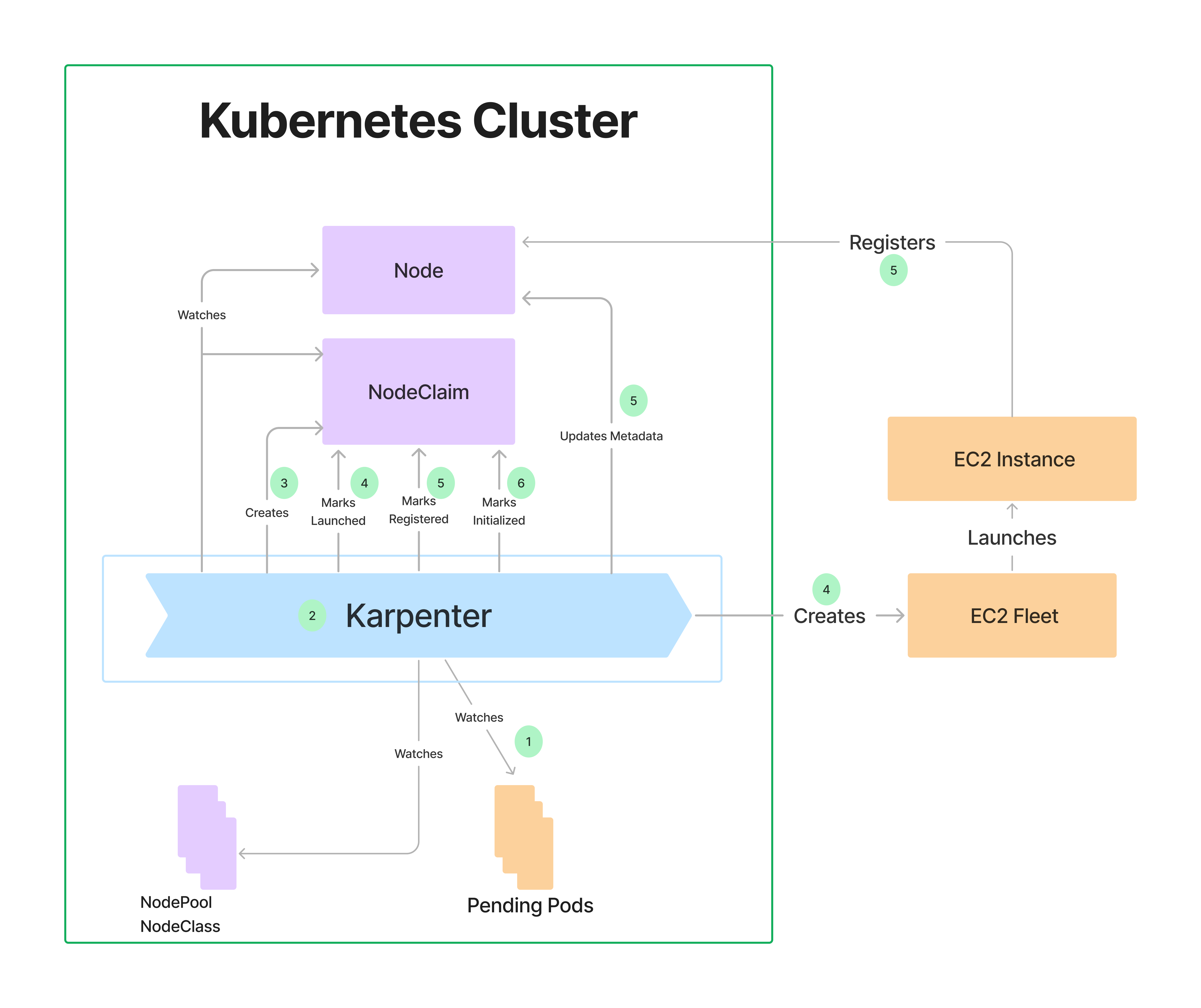
The following diagram illustrates how NodeClaims interact with other components during Karpenter-driven node creation.
Note
Configure the KARPENTER_NAMESPACE environment variable to the namespace where you’ve installed Karpenter (kube-system is the default). Follow along with the Karpenter logs in your cluster and do the following:
export KARPENTER_NAMESPACE="kube-system"
kubectl logs -f -n "${KARPENTER_NAMESPACE}" \
   -l app.kubernetes.io/name=karpenter
In a separate terminal, start some pods that would require Karpenter to create nodes to handle those pods. For example, start up some inflate pods as described in Scale up deployment.
As illustrated in the previous diagram, Karpenter interacts with NodeClaims and related components when creating a node:
Watches for pods and monitors NodePools and NodeClasses:
- Checks the pod scheduling constraints and resource requests.
- Cross-references the requirements with the existing NodePools and NodeClasses, (e.g. zones, arch, os)
Example log:
{
    "level": "INFO",
    "time": "2024-06-22T02:24:16.114Z",
    "message": "found provisionable pod(s)",
    "commit": "490ef94",
    "Pods": "default/inflate-66fb68585c-xvs86, default/inflate-66fb68585c-hpcdz, default/inflate-66fb68585c-8xztf,01234567adb205c7e default/inflate-66fb68585c-t29d8, default/inflate-66fb68585c-nxflz",
    "duration": "100.761702ms"
}
Computes the shape and size of a NodeClaim (or NodeClaims) to create in the cluster to fit the set of pods from step 1.
Example log:
{
    "level": "INFO",
    "time": "2024-06-22T02:24:16.114Z",
    "message": "computed new nodeclaim(s) to fit pod(s)",
    "controller": "provisioner",
    "nodeclaims": 1,
    "pods": 5
}
Creates the NodeClaim object in the cluster.
Example log:
{
    "level": "INFO",
    "time": "2024-06-22T02:24:16.128Z",
    "message": "created nodeclaim",
    "controller": "provisioner",
    "NodePool": {
        "name":"default"
    },
    "NodeClaim": {
        "name":"default-sfpsl"
    },
    "requests": {
        "cpu":"5150m",
        "pods":"8"
    },
    "instance-types": "c3.2xlarge, c4.2xlarge, c4.4xlarge, c5.2xlarge, c5.4xlarge and 55 other(s)"
}
Finds the new NodeClaim and translates it into an API call to create a cloud provider instance, logging the response of the API call.
If the API response is an unrecoverable error, such as an Insufficient Capacity Error, Karpenter will delete the NodeClaim, mark that instance type as temporarily unavailable, and create another NodeClaim if necessary.
Example log:
{
    "level": "INFO",
    "time": "2024-06-22T02:24:19.028Z",
    "message": "launched nodeclaim",
    "controller": "nodeclaim.lifecycle",
    "NodeClaim": {
        "name": "default-sfpsl"
    },
    "provider-id": "aws:///us-west-2b/i-01234567adb205c7e",
    "instance-type": "c3.2xlarge",
    "zone": "us-west-2b",
    "capacity-type": "spot",
    "allocatable": {
      "cpu": "7910m",
      "ephemeral-storage": "17Gi",
      "memory": "13215Mi",
      "pods": "58"
    }
}
Karpenter watches for the instance to register itself with the cluster as a node, and updates the node’s labels, annotations, taints, owner refs, and finalizer to match what was defined in the NodePool and NodeClaim. Once this step is completed, Karpenter will remove the
karpenter.sh/unregisteredtaint from the Node.If this fails to succeed within 15 minutes, Karpenter will remove the NodeClaim from the cluster and delete the underlying instance, creating another NodeClaim if necessary.
Example log:
{
  "level": "INFO",
  "time": "2024-06-22T02:26:19.028Z",
  "message": "registered nodeclaim",
  "controller": "nodeclaim.lifecycle",
  "NodeClaim": {
    "name": "default-sfpsl"
  },
  "provider-id": "aws:///us-west-2b/i-01234567adb205c7e",
  "Node": {
    "name": "ip-xxx-xxx-xx-xxx.us-west-2.compute.internal"
  }
}
Karpenter continues to watch the node, waiting until the node becomes ready, has all its startup taints removed, and has all requested resources registered on the node.
Example log:
{
  "level": "INFO",
  "time": "2024-06-22T02:24:52.642Z",
  "message": "initialized nodeclaim",
  "controller": "nodeclaim.lifecycle",
  "NodeClaim": {
    "name": "default-sfpsl"
  },
  "provider-id": "aws:///us-west-2b/i-01234567adb205c7e",
  "Node": {
    "name": "ip-xxx-xxx-xx-xxx.us-west-2.compute.internal"
  },
  "allocatable": {
    "cpu": "7910m",
    "ephemeral-storage": "18242267924",
    "hugepages-2Mi": "0",
    "memory": "14320468Ki",
    "pods": "58"
  }
}
NodeClaim example
The following is an example of a NodeClaim. Keep in mind that you cannot modify a NodeClaim.
To see the contents of a NodeClaim, get the name of your NodeClaim, then run kubectl describe to see its contents:
kubectl get nodeclaim
NAME            TYPE               ZONE         NODE                                           READY   AGE
default-m6pzn   c7i-flex.2xlarge   us-west-1a   ip-xxx-xxx-xx-xxx.us-west-1.compute.internal   True    7m50s

kubectl describe nodeclaim default-m6pzn
Starting at the bottom of this example, here are some highlights of what the NodeClaim contains:
- The Node Name (ip-xxx-xxx-xx-xxx.us-west-1.compute.internal) and Provider ID (aws:///us-west-1a/i-xxxxxxxxxxxxxxxxx) identify the instance that is fulfilling this NodeClaim.
- Image ID (ami-0ccbbed159cce4e37) represents the operating system image running on the node.
- Status shows the resources that are available on the node (CPU, memory, and so on) as well as the conditions associated with the node. The conditions show the status of the node, including whether the node is launched, registered, and initialized. This is particularly useful if Pods are not deploying to the node and you want to determine the cause.
- Spec contains the metadata required for Karpenter to launch and manage an instance. This includes any scheduling requirements, resource requirements, the NodeClass reference, taints, and immutable disruption fields (expireAfter and terminationGracePeriod).
- Additional information includes annotations and labels which should be synced to the Node, creation metadata, the termination finalizer, and the owner reference.
Name:         default-x9wxq
Namespace:
Labels:       karpenter.k8s.aws/instance-category=c
              karpenter.k8s.aws/instance-cpu=8
              karpenter.k8s.aws/instance-cpu-manufacturer=amd
              karpenter.k8s.aws/instance-ebs-bandwidth=3170
              karpenter.k8s.aws/instance-encryption-in-transit-supported=true
              karpenter.k8s.aws/instance-family=c5a
              karpenter.k8s.aws/instance-generation=5
              karpenter.k8s.aws/instance-hypervisor=nitro
              karpenter.k8s.aws/instance-memory=16384
              karpenter.k8s.aws/instance-network-bandwidth=2500
              karpenter.k8s.aws/instance-size=2xlarge
              karpenter.sh/capacity-type=spot
              karpenter.sh/nodepool=default
              kubernetes.io/arch=amd64
              kubernetes.io/os=linux
              node.kubernetes.io/instance-type=c5a.2xlarge
              topology.k8s.aws/zone-id=usw2-az3
              topology.kubernetes.io/region=us-west-2
              topology.kubernetes.io/zone=us-west-2c
Annotations:  compatibility.karpenter.k8s.aws/cluster-name-tagged: true
              compatibility.karpenter.k8s.aws/kubelet-drift-hash: 15379597991425564585
              karpenter.k8s.aws/ec2nodeclass-hash: 5763643673275251833
              karpenter.k8s.aws/ec2nodeclass-hash-version: v3
              karpenter.k8s.aws/tagged: true
              karpenter.sh/nodepool-hash: 377058807571762610
              karpenter.sh/nodepool-hash-version: v3
API Version:  karpenter.sh/v1
Kind:         NodeClaim
Metadata:
  Creation Timestamp:  2024-08-07T05:37:30Z
  Finalizers:
    karpenter.sh/termination
  Generate Name:  default-
  Generation:     1
  Owner References:
    API Version:           karpenter.sh/v1
    Block Owner Deletion:  true
    Kind:                  NodePool
    Name:                  default
    UID:                   6b9c6781-ac05-4a4c-ad6a-7551a07b2ce7
  Resource Version:        19600526
  UID:                     98a2ba32-232d-45c4-b7c0-b183cfb13d93
Spec:
  Expire After:  720h0m0s
  Node Class Ref:
    Group:
    Kind:   EC2NodeClass
    Name:   default
  Requirements:
    Key:       kubernetes.io/arch
    Operator:  In
    Values:
      amd64
    Key:       kubernetes.io/os
    Operator:  In
    Values:
      linux
    Key:       karpenter.sh/capacity-type
    Operator:  In
    Values:
      spot
    Key:       karpenter.k8s.aws/instance-category
    Operator:  In
    Values:
      c
      m
      r
    Key:       karpenter.k8s.aws/instance-generation
    Operator:  Gt
    Values:
      2
    Key:       karpenter.sh/nodepool
    Operator:  In
    Values:
      default
    Key:       node.kubernetes.io/instance-type
    Operator:  In
    Values:
      c3.xlarge
      c4.xlarge
      c5.2xlarge
      c5.xlarge
      c5a.xlarge
      c5ad.2xlarge
      c5ad.xlarge
      c5d.2xlarge
  Resources:
    Requests:
      Cpu:   3150m
      Pods:  6
  Startup Taints:
    Effect:  NoSchedule
    Key:     app.dev/example-startup
  Taints:
    Effect:                  NoSchedule
    Key:                     app.dev/example
  Termination Grace Period:  1h0m0s
Status:
  Allocatable:
    Cpu:                        7910m
    Ephemeral - Storage:        17Gi
    Memory:                     14162Mi
    Pods:                       58
    vpc.amazonaws.com/pod-eni:  38
  Capacity:
    Cpu:                        8
    Ephemeral - Storage:        20Gi
    Memory:                     15155Mi
    Pods:                       58
    vpc.amazonaws.com/pod-eni:  38
  Conditions:
    Last Transition Time:  2024-08-07T05:38:08Z
    Message:
    Reason:                Consolidatable
    Status:                True
    Type:                  Consolidatable
    Last Transition Time:  2024-08-07T05:38:07Z
    Message:
    Reason:                Initialized
    Status:                True
    Type:                  Initialized
    Last Transition Time:  2024-08-07T05:37:33Z
    Message:
    Reason:                Launched
    Status:                True
    Type:                  Launched
    Last Transition Time:  2024-08-07T05:38:07Z
    Message:
    Reason:                Ready
    Status:                True
    Type:                  Ready
    Last Transition Time:  2024-08-07T05:37:55Z
    Message:
    Reason:                Registered
    Status:                True
    Type:                  Registered
  Image ID:                ami-08946d4d49fc3f27b
  Node Name:               ip-xxx-xxx-xxx-xxx.us-west-2.compute.internal
  Provider ID:             aws:///us-west-2c/i-01234567890123
Events:
  Type    Reason             Age   From       Message
  ----    ------             ----  ----       -------
  Normal  Launched           70s   karpenter  Status condition transitioned, Type: Launched, Status: Unknown -> True, Reason: Launched
  Normal  DisruptionBlocked  70s   karpenter  Cannot disrupt NodeClaim: state node doesn't contain both a node and a nodeclaim
  Normal  Registered         48s   karpenter  Status condition transitioned, Type: Registered, Status: Unknown -> True, Reason: Registered
  Normal  Initialized        36s   karpenter  Status condition transitioned, Type: Initialized, Status: Unknown -> True, Reason: Initialized
  Normal  Ready              36s   karpenter  Status condition transitioned, Type: Ready, Status: Unknown -> True, Reason: Ready
NodeClaim API reference
The following is an annotated example of a NodeClaim resource.
apiVersion: karpenter.sh/v1
kind: NodeClaim
metadata:
  # NodeClaim names are auto-generated by Karpenter using the NodePool name as a prefix
  name: default-sfpsl
  # Labels are propagated from the NodePool's template and include well-known labels
  # resolved during scheduling (instance type, capacity type, zone, etc.)
  labels:
    billing-team: my-team
    karpenter.sh/capacity-type: spot
    karpenter.sh/nodepool: default
    node.kubernetes.io/instance-type: c5.2xlarge
    topology.kubernetes.io/zone: us-west-2b
    kubernetes.io/arch: amd64
    kubernetes.io/os: linux
  # Annotations are propagated from the NodePool's template
  annotations:
    example.com/owner: "my-team"
  # The NodeClaim is owned by the NodePool that created it
  ownerReferences:
    - apiVersion: karpenter.sh/v1
      kind: NodePool
      name: default
      blockOwnerDeletion: true
  # Karpenter adds a termination finalizer to ensure proper cleanup
  finalizers:
    - karpenter.sh/termination
spec:
  # References the Cloud Provider's NodeClass resource
  nodeClassRef:
    group: karpenter.k8s.aws
    kind: EC2NodeClass
    name: default

  # Taints applied to the node, propagated from the NodePool template
  taints:
    - key: example.com/special-taint
      effect: NoSchedule

  # Startup taints applied to the node on creation, expected to be removed by an external system
  startupTaints:
    - key: example.com/another-taint
      effect: NoSchedule

  # The amount of time a Node can live on the cluster before being removed
  # Inherited from the NodePool's spec.template.spec.expireAfter
  expireAfter: 720h

  # The maximum duration the controller will wait before forcefully deleting pods on the node
  # Inherited from the NodePool's spec.template.spec.terminationGracePeriod
  terminationGracePeriod: 48h

  # Requirements resolved during scheduling, combining NodePool requirements with pod constraints
  # These are the final, resolved requirements that were used to launch the instance
  requirements:
    - key: "kubernetes.io/arch"
      operator: In
      values: ["amd64"]
    - key: "kubernetes.io/os"
      operator: In
      values: ["linux"]
    - key: "karpenter.sh/capacity-type"
      operator: In
      values: ["spot"]
    - key: "karpenter.k8s.aws/instance-category"
      operator: In
      values: ["c", "m", "r"]
    - key: "karpenter.k8s.aws/instance-generation"
      operator: Gte
      values: ["3"]
    - key: "node.kubernetes.io/instance-type"
      operator: In
      values: ["c3.2xlarge", "c4.2xlarge", "c5.2xlarge", "c5.4xlarge", "m5.2xlarge"]
    - key: "topology.kubernetes.io/zone"
      operator: In
      values: ["us-west-2a", "us-west-2b"]

  # Resource requests represent the minimum resources needed to schedule the pods
  # that triggered this NodeClaim
  resources:
    requests:
      cpu: "5150m"
      pods: "8"
status:
  # The name of the Kubernetes Node object linked to this NodeClaim
  nodeName: ip-xxx-xxx-xx-xxx.us-west-2.compute.internal
  # The cloud provider identifier for the instance
  providerID: "aws:///us-west-2b/i-01234567adb205c7e"
  # The image (AMI) running on the instance
  imageID: ami-0ccbbed159cce4e37
  # Full capacity of the node
  capacity:
    cpu: "8"
    memory: "15155Mi"
    ephemeral-storage: "20Gi"
    pods: "58"
  # Allocatable resources available for pod scheduling
  allocatable:
    cpu: "7910m"
    memory: "14162Mi"
    ephemeral-storage: "17Gi"
    pods: "58"
  # Conditions track the lifecycle state of the NodeClaim
  conditions:
    - type: Launched
      status: "True"
      reason: Launched
    - type: Registered
      status: "True"
      reason: Registered
    - type: Initialized
      status: "True"
      reason: Initialized
    - type: Ready
      status: "True"
      reason: Ready
    - type: Consolidatable
      status: "True"
      reason: Consolidatable
metadata.labels
Labels on a NodeClaim come from two sources: labels defined in the NodePool’s spec.template.metadata.labels, and well-known labels resolved during scheduling (such as node.kubernetes.io/instance-type, topology.kubernetes.io/zone, karpenter.sh/capacity-type, and karpenter.sh/nodepool). These labels are synced to the corresponding Kubernetes Node.
Note
There is currently a limit of 100 on the total number of requirements on both the NodePool and the NodeClaim. Labels defined inspec.template.metadata.labels on the NodePool are propagated as requirements on the NodeClaim, meaning that you can’t have more than 100 requirements and labels combined set on your NodePool.metadata.annotations
Annotations on a NodeClaim are propagated from the NodePool’s spec.template.metadata.annotations. Karpenter also adds internal annotations for tracking hash versions and cloud-provider-specific metadata. These annotations are synced to the corresponding Kubernetes Node.
metadata.ownerReferences
Each Karpenter-created NodeClaim has an owner reference pointing to the NodePool that created it, with blockOwnerDeletion: true. This means deleting a NodePool will cascade-delete all of its NodeClaims.
metadata.finalizers
Karpenter adds a karpenter.sh/termination finalizer to every NodeClaim. This finalizer ensures that when a NodeClaim is deleted, Karpenter properly cordons the node, drains pods, terminates the cloud provider instance, and cleans up the Node object before removing the finalizer.
spec.nodeClassRef
This field references the cloud provider’s NodeClass resource that defines provider-specific configuration for the instance. See EC2NodeClasses for details.
The reference includes:
group: The API group of the NodeClass (e.g.,karpenter.k8s.aws)kind: The kind of the NodeClass (e.g.,EC2NodeClass)name: The name of the NodeClass resource
spec.taints
Taints that are applied to the provisioned node. These are inherited from the NodePool’s spec.template.spec.taints. Pods that don’t tolerate these taints will not be scheduled on the node.
See Taints and Tolerations for details.
spec.startupTaints
Startup taints are applied to the node upon creation but are expected to be removed by an external system (e.g., a DaemonSet) after initialization completes. These are inherited from the NodePool’s spec.template.spec.startupTaints. Pods do not need to tolerate startup taints to be considered for provisioning — Karpenter assumes they are temporary.
spec.expireAfter
The duration a node can live on the cluster before Karpenter deletes it, inherited from the NodePool’s spec.template.spec.expireAfter. Once the expiration time is reached, the node begins draining. This defaults to 720h (30 days). Set to Never to disable expiration.
Changing expireAfter on the NodePool will cause existing NodeClaims to drift.
spec.terminationGracePeriod
The maximum duration Karpenter will wait before forcefully deleting pods on a draining node, inherited from the NodePool’s spec.template.spec.terminationGracePeriod. Once this period is reached, Karpenter will forcibly delete pods regardless of PodDisruptionBudgets or the karpenter.sh/do-not-disrupt annotation.
Karpenter will preemptively delete pods so their terminationGracePeriodSeconds aligns with the node’s terminationGracePeriod. If left undefined, the controller will wait indefinitely for pods to drain.
Changing terminationGracePeriod on the NodePool will cause existing NodeClaims to drift.
spec.requirements
The resolved scheduling requirements for the NodeClaim. These combine the NodePool’s spec.template.spec.requirements with the scheduling constraints from the pods that triggered provisioning (nodeSelector, nodeAffinity, etc.). The same operators are supported: In, NotIn, Exists, DoesNotExist, Gt, Lt, Gte, and Lte.
These requirements represent the final constraints that were used to select the instance type and launch the node. They include well-known labels like node.kubernetes.io/instance-type, topology.kubernetes.io/zone, kubernetes.io/arch, and karpenter.sh/capacity-type.
spec.resources
Resource requests represent the minimum resources needed to schedule the pods that triggered this NodeClaim. Karpenter uses these to right-size the instance.
spec.resources.requests: The aggregate resource requests (e.g.,cpu,memory,pods) from the pods being scheduled onto this NodeClaim.
status.nodeName
The name of the Kubernetes Node object linked to this NodeClaim. This is populated after the instance registers with the cluster.
status.providerID
The cloud provider identifier for the instance (e.g., aws:///us-west-2b/i-01234567adb205c7e). This is populated after the instance is launched.
status.imageID
The identifier for the image running on the instance (e.g., an AMI ID like ami-0ccbbed159cce4e37).
status.capacity
The estimated full capacity of the node, including resources reserved by the system. This includes cpu, memory, ephemeral-storage, pods, and any extended resources (e.g., vpc.amazonaws.com/pod-eni).
status.allocatable
The estimated allocatable capacity of the node — the resources actually available for pod scheduling after system reservations. This is typically less than status.capacity.
status.conditions
Conditions track the lifecycle state of the NodeClaim. Each condition has a type, status (True, False, or Unknown), reason, message, and lastTransitionTime.
| Condition Type | Description |
|---|---|
| Launched | The cloud provider instance has been successfully created |
| Registered | The instance has joined the cluster as a Kubernetes Node and Karpenter has synced labels, taints, and owner refs |
| Initialized | The node is ready, startup taints have been removed, and all requested resources are registered |
| Ready | Top-level condition indicating the NodeClaim is fully operational. True only when Launched, Registered, and Initialized are all True |
| Consolidatable | The node is a candidate for consolidation (empty or underutilized) |
| Drifted | The NodeClaim has drifted from its desired specification (e.g., NodePool or NodeClass changed) |
| Drained | The node has been fully drained of pods during termination |
| VolumesDetached | All volumes have been detached from the instance during termination |
| InstanceTerminating | The cloud provider instance is in the process of being terminated |
| ConsistentStateFound | Karpenter has verified the instance state is consistent with the NodeClaim |