# Disruption
> Understand different ways Karpenter disrupts nodes
## Control Flow
Karpenter sets a Kubernetes [finalizer](https://kubernetes.io/docs/concepts/overview/working-with-objects/finalizers/) on each node and node claim it provisions.
The finalizer blocks deletion of the node object while the Termination Controller taints and drains the node, before removing the underlying NodeClaim. Disruption is triggered by the Disruption Controller, by the user through manual disruption, or through an external system that sends a delete request to the node object.
### Disruption Controller
Karpenter automatically discovers disruptable nodes and spins up replacements when needed. Karpenter disrupts nodes by executing one [automated method](#automated-graceful-methods) at a time, first doing [Node Repair](#node-auto-repair) (when enabled), then Drift, then Consolidation. Each method varies slightly, but they all follow the standard disruption process. Karpenter uses [disruption budgets](#nodepool-disruption-budgets) to control the speed at which these disruptions begin.
1. Identify a list of prioritized candidates for the disruption method.
* If there are [pods that cannot be evicted](#pod-level-controls) on the node, Karpenter will ignore the node and try disrupting it later.
* If there are no disruptable nodes, continue to the next disruption method.
2. For each disruptable node:
1. Check if disrupting it would violate its NodePool's disruption budget.
2. Execute a scheduling simulation with the pods on the node to find if any replacement nodes are needed.
3. Add the `karpenter.sh/disrupted:NoSchedule` taint to the node(s) to prevent pods from scheduling to it.
4. Pre-spin any replacement nodes needed as calculated in Step (2), and wait for them to become ready.
* If a replacement node fails to initialize, un-taint the node(s), and restart from Step (1), starting at the first disruption method again.
* If the replacement can only be launched after the node is terminated, Karpenter may skip this step. See [Terminate-First Disruption](#terminate-first-disruption).
5. Delete the node(s) and wait for the Termination Controller to gracefully shutdown the node(s).
6. Once the Termination Controller terminates the node, go back to Step (1), starting at the first disruption method again.
### Termination Controller
When a Karpenter node is deleted, the Karpenter finalizer will block deletion and the APIServer will set the `DeletionTimestamp` on the node, allowing Karpenter to gracefully shutdown the node, modeled after [Kubernetes Graceful Node Shutdown](https://kubernetes.io/docs/concepts/cluster-administration/node-shutdown/#graceful-node-shutdown). Karpenter's graceful shutdown process will:
1. Add the `karpenter.sh/disrupted:NoSchedule` taint to the node to prevent pods from scheduling to it.
2. Begin evicting the pods on the node with the [Kubernetes Eviction API](https://kubernetes.io/docs/concepts/scheduling-eviction/api-eviction/) to respect PDBs, while ignoring all [static pods](https://kubernetes.io/docs/tasks/configure-pod-container/static-pod/), pods tolerating the `karpenter.sh/disrupted:NoSchedule` taint, and succeeded/failed pods. Wait for the node to be fully drained before proceeding to Step (3).
* While waiting, if the underlying NodeClaim for the node no longer exists, remove the finalizer to allow the APIServer to delete the node, completing termination.
3. Verify that all [VolumeAttachment](https://kubernetes.io/docs/reference/kubernetes-api/config-and-storage-resources/volume-attachment-v1/) resources for drain-able pods are deleted.
4. Terminate the NodeClaim in the Cloud Provider.
5. Remove the finalizer from the node to allow the APIServer to delete the node, completing termination.
## Manual Methods
* **Node Deletion**: You can use `kubectl` to manually remove a single Karpenter node or nodeclaim. Since each Karpenter node is owned by a NodeClaim, deleting either the node or the nodeclaim will cause cascade deletion of the other:
```bash
# Delete a specific nodeclaim
kubectl delete nodeclaim $NODECLAIM_NAME
# Delete a specific node
kubectl delete node $NODE_NAME
# Delete all nodeclaims
kubectl delete nodeclaims --all
# Delete all nodes owned by any nodepool
kubectl delete nodes -l karpenter.sh/nodepool
# Delete all nodeclaims owned by a specific nodepool
kubectl delete nodeclaims -l karpenter.sh/nodepool=$NODEPOOL_NAME
```
* **NodePool Deletion**: NodeClaims are owned by the NodePool through an [owner reference](https://kubernetes.io/docs/concepts/overview/working-with-objects/owners-dependents/#owner-references-in-object-specifications) that launched them. Karpenter will gracefully terminate nodes through cascading deletion when the owning NodePool is deleted.
Note
By adding the finalizer, Karpenter improves the default Kubernetes process of node deletion.
When you run kubectl delete node on a node without a finalizer, the node is deleted without triggering the finalization logic. The instance will continue running in EC2, even though there is no longer a node object for it. The kubelet isn’t watching for its own existence, so if a node is deleted, the kubelet doesn’t terminate itself. All the pod objects get deleted by a garbage collection process later, because the pods’ node is gone.
## Automated Graceful Methods
Automated graceful methods, can be rate limited through [NodePool Disruption Budgets](#nodepool-disruption-budgets)
* [**Consolidation**](#consolidation): Karpenter works to actively reduce cluster cost by identifying when:
* Nodes can be removed because the node is empty
* Nodes can be removed as their workloads will run on other nodes in the cluster.
* Nodes can be replaced with lower priced variants due to a change in the workloads.
* [**Drift**](#drift): Karpenter will mark nodes as drifted and disrupt nodes that have drifted from their desired specification. See [Drift](#drift) to see which fields are considered.
* [**Node Auto Repair**](#node-auto-repair): Karpenter will replace nodes that report an unhealthy status condition for longer than the cloud provider's toleration duration.
Defaults
Disruption is configured through the NodePool’s disruption block by the consolidationPolicy, and consolidateAfter fields. Karpenter will configure these fields with the following values by default if they are not set:
spec:
  disruption:
    consolidationPolicy: WhenEmptyOrUnderutilized
    consolidateAfter: 0s
### Consolidation
Consolidation is configured by `consolidationPolicy` and `consolidateAfter`. `consolidationPolicy` determines which nodes Karpenter considers for consolidation, trading off cost savings against how much Karpenter disrupts your running pods to achieve them:
| Policy | Nodes it considers | Choose it when |
|---|---|---|
| `WhenEmpty` | Only empty nodes (a node is empty when it has only pods with no disruption cost, such as daemonsets, user overrides, and ephemeral pods that the user has annotated as cheap to disrupt) | You want the most conservative behavior: nodes are removed only once nothing is running on them, so consolidation only evicts running pods that have zero disruption cost. |
| `Balanced` | Nodes where the cost savings outweigh the disruption to running pods | You want most of the savings of `WhenEmptyOrUnderutilized` but not the churn from marginal consolidations where the cost savings feels smaller than the pod disruption cost. Karpenter still removes empty and clearly-underutilized nodes, but skips actions where the disruption isn't worth the savings. See [Balanced consolidation](#balanced-consolidation). |
| `WhenEmptyOrUnderutilized` | Any node that can be removed or replaced to reduce cost | You want the lowest possible cost and are willing to accept the pod disruption it takes to get there. |
`consolidateAfter` determines how long Karpenter should wait for new work to land on a node before considering it in consolidation. Karpenter resets this timer whenever a pod is added to or removed from the node, so a node only becomes a consolidation candidate once it has been stable for the full `consolidateAfter` duration. Setting a longer value gives churning workloads time to settle and reduces how aggressively Karpenter consolidates; setting it to `Never` disables consolidation for the NodePool entirely.
Karpenter has two mechanisms for cluster consolidation:
1. **Deletion** - A node is eligible for deletion if all of its pods can run on free capacity of other nodes in the cluster.
2. **Replace** - A node can be replaced if all of its pods can run on a combination of free capacity of other nodes in the cluster and a single lower price replacement node.
Consolidation has three mechanisms that are performed in order to attempt to identify a consolidation action:
1. **Empty Node Consolidation** - Delete any entirely empty nodes in parallel
2. **Multi Node Consolidation** - Try to delete two or more nodes in parallel, possibly launching a single replacement whose price is lower than that of all nodes being removed
3. **Single Node Consolidation** - Try to delete any single node, possibly launching a single replacement whose price is lower than that of the node being removed
It's impractical to examine all possible consolidation options for multi-node consolidation, so Karpenter uses a heuristic to identify a likely set of nodes that can be consolidated. For single-node consolidation we consider each node in the cluster individually.
When there are multiple nodes that could be potentially deleted or replaced, Karpenter chooses to consolidate the node that overall disrupts your workloads the least by preferring to terminate:
* Nodes running fewer pods
* Nodes that will expire soon
* Nodes with lower priority pods
* Nodes that have a lower total [`disruption-cost`](#disruption-cost)
If consolidation is enabled, Karpenter periodically reports events against nodes that indicate why the node can't be consolidated. These events can be used to investigate nodes that you expect to have been consolidated, but still remain in your cluster.
```bash
Events:
Type Reason Age From Message
---- ------ ---- ---- -------
Normal Unconsolidatable 66s karpenter pdb default/inflate-pdb prevents pod evictions
Normal Unconsolidatable 33s (x3 over 30m) karpenter can't replace with a lower-priced node
```
Warning
Using preferred anti-affinity and topology spreads can reduce the effectiveness of consolidation. At node launch, Karpenter attempts to satisfy affinity and topology spread preferences. In order to reduce node churn, consolidation must also attempt to satisfy these constraints to avoid immediately consolidating nodes after they launch. This means that consolidation may not disrupt nodes in order to avoid violating preferences, even if kube-scheduler can fit the host pods elsewhere. Karpenter reports these pods via logging to bring awareness to the possible issues they can cause (e.g. pod default/inflate-anti-self-55894c5d8b-522jd has a preferred Anti-Affinity which can prevent consolidation).
#### Balanced consolidation
`Balanced` scores each consolidation action by weighing how much of the NodePool's cost it saves against how much of the NodePool's total pod disruption it causes, and takes the action only when the savings are large enough relative to the disruption.
```yaml
spec:
disruption:
consolidationPolicy: Balanced
```
By default every pod contributes an equal weight to disruption, so an action's disruption is effectively the number of pods it evicts, and scoring reduces to a comparison of savings against pod count. Pods that are more expensive to move can carry more weight — for example, higher-priority pods count as more disruptive — which makes their node less likely to be consolidated.
Karpenter records each scoring decision so you can see why an action was or wasn't taken. Approved actions emit a `ConsolidationApproved` event (on the Node and on the NodeClaim for single-node actions, on the NodePool for multi-node actions) that includes the score and the savings and disruption percentages. Scoring decisions are also exported as the `karpenter_consolidation_score` and `karpenter_consolidation_moves_total` [metrics](/v1.15/reference/metrics/index.md), labeled by decision, NodePool, and policy, and logged at `--log-level debug`.
#### Pod deletion cost management
When a Deployment scales in, the ReplicaSet controller doesn't know which nodes Karpenter wants to consolidate. The alpha `PodDeletionCostManagement` feature gate lets Karpenter steer ReplicaSet scale-down toward those nodes. See [Pod Deletion Cost](/v1.15/concepts/pod-deletion-cost/index.md).
#### Spot consolidation
For spot nodes, Karpenter has deletion consolidation enabled by default. If you would like to enable replacement with spot consolidation, you need to enable the feature through the [`SpotToSpotConsolidation` feature flag](/v1.15/reference/settings/index.md#features-gates).
Lower priced spot instance types are selected with the [`price-capacity-optimized` strategy](https://aws.amazon.com/blogs/compute/introducing-price-capacity-optimized-allocation-strategy-for-ec2-spot-instances/). Sometimes, the lowest priced spot instance type is not launched due to the likelihood of interruption. As a result, Karpenter uses the number of available instance type options with a price lower than the currently launched spot instance as a heuristic for evaluating whether it should launch a replacement for the current spot node.
We refer to the number of instances that Karpenter has within its launch decision as a launch's "instance type flexibility." When Karpenter is considering performing a spot-to-spot consolidation replacement, it will check whether replacing the instance type will lead to enough instance type flexibility in the subsequent launch request. As a result, we get the following properties when evaluating for consolidation:
1) We shouldn't continually consolidate down to the lowest priced spot instance which might have very high rates of interruption.
2) We launch with enough instance types that there’s high likelihood that our replacement instance has comparable availability to our current one.
Karpenter requires a minimum instance type flexibility of 15 instance types when performing single node spot-to-spot consolidations (1 node to 1 node). It does not have the same instance type flexibility requirement for multi-node spot-to-spot consolidations (many nodes to 1 node) since doing so without requiring flexibility won't lead to "race to the bottom" scenarios.
### Drift
Drift handles changes to the NodePool/EC2NodeClass. For Drift, values in the NodePool/EC2NodeClass are reflected in the NodeClaimTemplateSpec/EC2NodeClassSpec in the same way that they’re set. A NodeClaim will be detected as drifted if the values in its owning NodePool/EC2NodeClass do not match the values in the NodeClaim. Similar to the upstream `deployment.spec.template` relationship to pods, Karpenter will annotate the owning NodePool and EC2NodeClass with a hash of the NodeClaimTemplateSpec to check for drift. Some special cases will be discovered either from Karpenter or through the CloudProvider interface, triggered by NodeClaim/Instance/NodePool/EC2NodeClass changes.
#### Special Cases on Drift
In special cases, drift can correspond to multiple values and must be handled differently. Drift on resolved fields can create cases where drift occurs without changes to CRDs, or where CRD changes do not result in drift. For example, if a NodeClaim has `node.kubernetes.io/instance-type: m5.large`, and requirements change from `node.kubernetes.io/instance-type In [m5.large]` to `node.kubernetes.io/instance-type In [m5.large, m5.2xlarge]`, the NodeClaim will not be drifted because its value is still compatible with the new requirements. Conversely, if a NodeClaim is using a NodeClaim image `ami: ami-abc`, but a new image is published, Karpenter's `EC2NodeClass.spec.amiSelectorTerms` will discover that the new correct value is `ami: ami-xyz`, and detect the NodeClaim as drifted.
##### NodePool
| Fields |
|----------------|
| spec.template.spec.requirements |
##### EC2NodeClass
| Fields |
|-------------------------------|
| spec.subnetSelectorTerms |
| spec.securityGroupSelectorTerms |
| spec.amiSelectorTerms |
#### Behavioral Fields
Behavioral Fields are treated as over-arching settings on the NodePool to dictate how Karpenter behaves. These fields don’t correspond to settings on the NodeClaim or instance. They’re set by the user to control Karpenter’s Provisioning and disruption logic. Since these don’t map to a desired state of NodeClaims, __behavioral fields are not considered for Drift__.
##### NodePool
| Fields |
|---------------------|
| spec.weight |
| spec.limits |
| spec.disruption.* |
Read the [Drift Design](https://github.com/aws/karpenter-core/blob/main/designs/drift.md) for more.
Karpenter will add the `Drifted` status condition on NodeClaims if the NodeClaim is drifted from its owning NodePool. Karpenter will also remove the `Drifted` status condition if either:
1. The `Drift` feature gate is not enabled but the NodeClaim is drifted, Karpenter will remove the status condition.
2. The NodeClaim isn't drifted, but has the status condition, Karpenter will remove it.
### Terminate-First Disruption
Feature State: Karpenter v1.15.0 [alpha](/v1.15/reference/settings/index.md#feature-gates)
Karpenter normally pre-spins a replacement before it terminates a disrupted node.
Some NodePools can't do that because the capacity the replacement needs is held by the node being replaced:
* **Full capacity reservations:** A node launched into an [ODCR or Capacity Block](/v1.15/tasks/odcrs/index.md) that has no free capacity can't be replaced within the same reservation until the node releases its slot.
* **Static NodePools at their node limit:** A [static NodePool](/v1.15/concepts/nodepools/index.md#specreplicas) whose `limits.nodes` is equal to its `replicas` can't launch a replacement without exceeding the limit.
Without terminate-first disruption, Karpenter can't disrupt these nodes, and a drifted node stays on its old configuration (for example, an out-of-date AMI). The node emits `DisruptionBlocked` events.
With terminate-first disruption enabled, Karpenter deletes the node first, waits for it to terminate, and then launches a replacement into the freed capacity.
Terminate-first disruption is enabled per disruption method through feature gates:
| Feature Gate | Disruption Method |
|---|---|
| `TerminateFirstDrift` | [Drift](#drift) |
| `TerminateFirstRepair` | [Node Auto Repair](#node-auto-repair) |
`TerminateFirstRepair` only takes effect when the `NodeRepair` feature gate is also enabled.
Karpenter only terminates a node first when a replacement can't be pre-spun:
* **Dynamic NodePools:** Karpenter first simulates rescheduling the node's pods as usual. If the pods can run elsewhere, such as on existing nodes, in a different reservation that has capacity, or in a lower-[weight](/v1.15/concepts/nodepools/index.md#specweight) on-demand or spot NodePool, Karpenter pre-spins a replacement. If they can't, and the node is in a capacity reservation, Karpenter simulates again with the node's reservation slot released. If the released slot is enough to reschedule all of the node's pods, Karpenter terminates the node first. Otherwise, the node is blocked from disruption as before.
* **Static NodePools:** If the NodePool is below its `limits.nodes`, Karpenter pre-spins a replacement. If the NodePool is at its limit, Karpenter terminates the node first and then provisions back up to `replicas`.
Terminate-first disruption still respects [NodePool Disruption Budgets](#nodepool-disruption-budgets), and the node is drained through the [Termination Controller](#termination-controller), which respects PDBs and `terminationGracePeriod`.
Karpenter records these commands as `terminate-first` in the `decision` label of the `karpenter_voluntary_disruption_decisions_total` [metric](/v1.15/reference/metrics/index.md).
Warning
Terminate-first disruption temporarily reduces capacity. The node’s pods stay pending from the time the node is drained until its replacement is ready.
Use PodDisruptionBudgets and NodePool Disruption Budgets to limit how many nodes are terminated at once.
Karpenter assumes that it can relaunch into the slot the terminated node frees. Anything else that launches into the same capacity reservation can claim the freed slot first, for example another Karpenter installation, an Auto Scaling group, or a manual launch. With an open reservation, any matching instance launched in the account can consume the slot. The node’s pods then stay pending until capacity frees up in the reservation, which can cause an unbounded availability outage. Don’t enable terminate-first disruption unless this Karpenter installation is the only thing that launches into its capacity reservations.
### Node Auto Repair
Feature State: Karpenter v1.1.0 [alpha](/v1.15/reference/settings/index.md#feature-gates)
Node Auto Repair automatically identifies and repairs unhealthy nodes in your cluster, either by replacing them or by [rebooting them in place](#repair-actions). Nodes can experience various types of failures affecting their hardware, file systems, or container environments. These failures are surfaced through node status conditions, set either by the kubelet or by a node diagnostic agent such as the [EKS Node Monitoring Agent](https://docs.aws.amazon.com/eks/latest/userguide/node-health.html). When a node reports one of the [monitored conditions](#monitored-node-conditions) for longer than that condition's toleration duration, Karpenter repairs it.
To enable Node Auto Repair:
1. Ensure you have a [Node Monitoring Agent](https://docs.aws.amazon.com/en_us/eks/latest/userguide/node-health.html) deployed or any agent that will add status conditions to nodes that are supported (e.g., Node Problem Detector)
2. Enable the feature flag: `NodeRepair=true`. See [Feature Gates](/v1.15/reference/settings/index.md#feature-gates).
Node repair is a graceful disruption method, and it follows the same [standard disruption process](#disruption-controller) as Drift and Consolidation:
* **Pre-spin:** For a replacement, Karpenter launches a replacement node, waits for it to become ready, and only then terminates the unhealthy node. If the node's pods can't be rescheduled, Karpenter emits a `DisruptionBlocked` event on the node and retries later.
* **Budgets:** Repair is rate limited by [NodePool Disruption Budgets](#nodepool-disruption-budgets) under the `Unhealthy` reason. Unlike other reasons, nodes that are `NotReady` do not count against the `Unhealthy` budget, so a wave of unhealthy nodes does not block the repairs that would fix them. Only nodes that are already being deleted or [rebooted](#repair-actions) count against it.
* **Drain:** Karpenter drains the node through the [Termination Controller](#termination-controller), which respects PDBs. Each [monitored condition](#monitored-node-conditions) has a termination grace period that bounds the drain. Karpenter uses the shorter of that period and the NodeClaim's [`terminationGracePeriod`](#terminationgraceperiod). A termination grace period of `0` means Karpenter skips the drain. Pods with blocking PDBs or the `karpenter.sh/do-not-disrupt` annotation don't stop Karpenter from selecting a node for repair, and can't delay its drain past the termination grace period.
* **Ordering:** When several nodes are eligible, Karpenter repairs the node that has been unhealthy past its toleration duration the longest.
Karpenter includes safety mechanisms to prevent cascading failures. If more than 20% of the nodes in a NodePool report a monitored condition, Karpenter stops repairing that NodePool, because the failure is likely correlated (for example, a bad AMI or an Availability Zone outage) and replacing nodes would not fix it. Karpenter emits a `NodeRepairBlocked` warning event on the node, NodeClaim, and NodePool while repair is blocked. The 20% threshold counts a node as unhealthy as soon as it reports a monitored condition, before its toleration duration elapses.
If a replacement can't be pre-spun, for example because the node is in a full capacity reservation or its static NodePool is at its node limit, repair is blocked unless you enable the `TerminateFirstRepair` feature gate. See [Terminate-First Disruption](#terminate-first-disruption).
To opt a node out of repair, annotate it with `karpenter.sh/do-not-repair: "true"`. See [Node-Level Controls](#node-level-controls).
#### Repair Actions
Each [monitored condition](#monitored-node-conditions) has a repair action, and can match on the condition's reason. For example, a transient GPU error is rebooted while a fatal one is replaced. When a node matches several conditions, Karpenter takes the most disruptive action.
Rebooting for repair is opt-in through the `RebootForRepair` [AWS feature gate](/v1.15/reference/settings/index.md#aws-specific-feature-gates) (alpha, disabled by default), which needs the `ec2:RebootInstances` permission. Without it, policies with the `RebootNode` action replace the node instead, on the same toleration duration and termination grace period.
* **Replace:** Karpenter replaces the node, as described above.
* **Reboot:** Karpenter reboots the node's instance in place, keeping the instance, its capacity, and its local storage. This suits faults that a reboot clears, on instances that are scarce or slow to replace.
A reboot follows these steps:
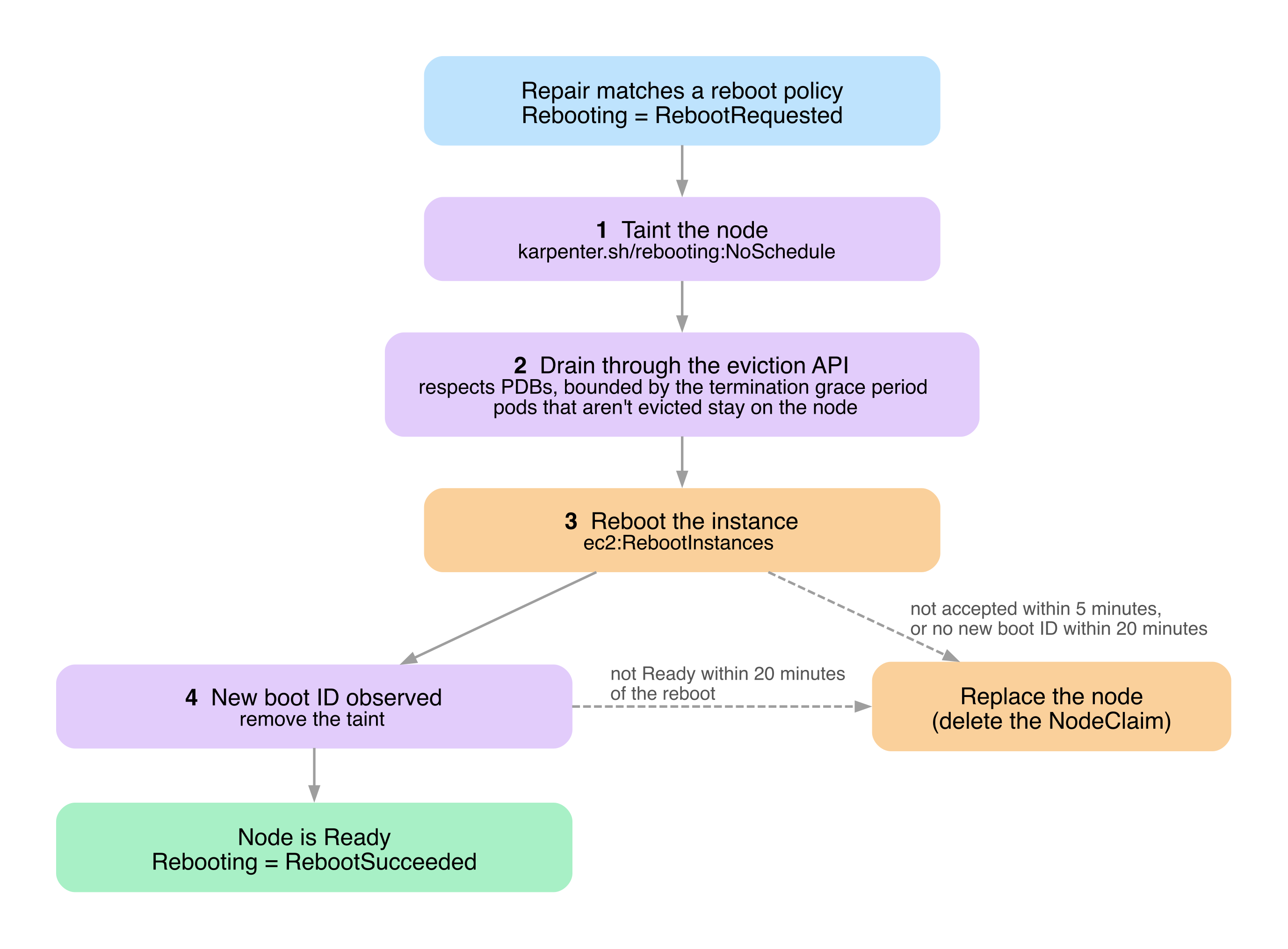
1. Karpenter taints the node with `karpenter.sh/rebooting:NoSchedule` so that no new pods schedule to it.
2. Karpenter drains the node through the eviction API, which respects PDBs, bounded by the same termination grace period as a replacement. Pods that haven't been evicted when the grace period ends stay on the node through the reboot; Karpenter doesn't delete them. With a termination grace period of `0`, Karpenter skips the drain and every pod stays on the node.
3. Karpenter reboots the instance through the cloud provider (`ec2:RebootInstances`).
4. When the node reports a new boot ID, Karpenter removes the taint. The reboot succeeds once the node is also `Ready`.
Pods that stay on the node restart in place when it comes back, unless the kubelet stops them first: with a non-zero `shutdownGracePeriod`, the kubelet's graceful node shutdown terminates them and their controllers recreate them. A reboot that keeps the node `NotReady` past a pod's `NoExecute` toleration (300 seconds by default) also evicts it.
While a node is rebooting, other disruption methods don't select it, and it counts against the [disruption budgets](#nodepool-disruption-budgets) for every reason. Karpenter treats the node as uninitialized from the reboot until it becomes `Ready` again and its resources are re-registered.
Karpenter replaces the node if the reboot fails: if the cloud provider rejects the reboot with an error that retrying can't fix, such as a missing `ec2:RebootInstances` permission (immediately), if it keeps rejecting the reboot with other errors for 5 minutes after the drain finishes, or if the node doesn't come back with a new boot ID and `Ready` within 20 minutes of the reboot. The replacement isn't pre-spun, because the node has already been drained.
If Karpenter has already rebooted a node twice in the last 24 hours, it replaces the node instead of rebooting it again: a fault that keeps coming back after a reboot usually isn't one a reboot clears, so further reboots would only delay the repair while disrupting the node's workloads each time. Karpenter keeps this count in memory, so a controller restart resets it.
To follow a reboot, check the NodeClaim's `Rebooting` status condition. Its reason moves from `RebootRequested` (draining) to `RebootIssued` (rebooting), and then to `RebootSucceeded` or `RebootFailed`.
Karpenter records reboot outcomes in the `karpenter_nodes_reboots_total` [metric](/v1.15/reference/metrics/index.md), labeled by `result`, and records reboot decisions as `reboot` in the `decision` label of `karpenter_voluntary_disruption_decisions_total`.
#### Monitored Node Conditions
Karpenter repairs nodes that report the following node status conditions. `Ready` is reported by the kubelet. The other conditions are reported by the [EKS Node Monitoring Agent](https://docs.aws.amazon.com/eks/latest/userguide/node-health.html).
A policy matches the condition's reason with a [Go regular expression](https://pkg.go.dev/regexp/syntax); a reason that no other policy matches uses the default policy. The toleration duration is how long a node must report the condition before Karpenter repairs it. The termination grace period bounds the drain, as described above. Policies with the `RebootNode` action reboot the node only with the `RebootForRepair` AWS feature gate enabled; otherwise they replace it on the same toleration duration and termination grace period.
[comment]: <> (the content below is generated from hack/docs/repairpolicies_gen/main.go)
| Condition Type | Status | Reason | Toleration Duration | Termination Grace Period | Action |
|---|---|---|---|---|---|
| `Ready` | `False` | Any | 30 minutes | 10 minutes | `ReplaceNode` |
| `Ready` | `Unknown` | Any | 30 minutes | 10 minutes | `ReplaceNode` |
| `AcceleratedHardwareReady` | `False` | `.*XID(46\|48\|54\|62\|63\|95\|109\|110\|136\|140\|143\|155\|156\|158).*` | 10 minutes | 5 minutes | `RebootNode` |
| `AcceleratedHardwareReady` | `False` | `.*XID(64\|74\|79\|119\|120).*` | 10 minutes | 5 minutes | `ReplaceNode` |
| `AcceleratedHardwareReady` | `False` | Any reason not matched by another policy for the condition | 30 minutes | 10 minutes | `ReplaceNode` |
| `StorageReady` | `False` | Any | 30 minutes | 10 minutes | `ReplaceNode` |
| `NetworkingReady` | `False` | Any | 30 minutes | 10 minutes | `ReplaceNode` |
| `KernelReady` | `False` | Any | 30 minutes | 10 minutes | `ReplaceNode` |
| `ContainerRuntimeReady` | `False` | Any | 30 minutes | 10 minutes | `ReplaceNode` |
[comment]: <> (end docs generated content from hack/docs/repairpolicies_gen/main.go)
#### Legacy Node Repair
Warning
We plan to deprecate the legacy node repair controller. If you use it because the new one does not work for you, please
open an issue with your use case/problem.
To use the legacy node repair controller (pre-1.15) before node repair became a graceful disruption method, enable the `NodeRepair` feature gate and also set `--legacy-node-repair` (`LEGACY_NODE_REPAIR=true`).
The legacy controller only replaces nodes, and uses the repair policies from before 1.15 instead of the [Monitored Node Conditions](#monitored-node-conditions) above. They match every reason of a condition:
| Condition | Status | Toleration Duration |
|---|---|---|
| Ready | False | 30 minutes |
| Ready | Unknown | 30 minutes |
| AcceleratedHardwareReady | False | 10 minutes |
| StorageReady | False | 30 minutes |
| NetworkingReady | False | 30 minutes |
| KernelReady | False | 30 minutes |
| ContainerRuntimeReady | False | 30 minutes |
When a node reports one of these conditions for longer than its toleration duration, Karpenter deletes the node's NodeClaim and forcefully terminates it, without pre-spinning a replacement. It sets the NodeClaim's termination timestamp to the current time, so the drain bypasses PDBs. It ignores NodePool Disruption Budgets and the `karpenter.sh/do-not-disrupt` annotation. It has its own 20% breaker: if more than 20% of the nodes in a NodePool (or in the cluster, for NodeClaims without a NodePool) report one of these conditions, it stops repairing them and retries every 5 minutes. It emits `karpenter_nodeclaims_unhealthy_disrupted_total` and `karpenter_nodeclaims_disrupted_total` with the `unhealthy` reason.
The legacy controller does not support:
* [Terminate-First Disruption](#terminate-first-disruption) (`TerminateFirstRepair`)
* The `RebootNode` action, or reason granularity for policies. For example, an `AcceleratedHardwareReady` GPU fault is replaced after 10 minutes regardless of the reason, including reasons the default policies would reboot.
* Repair policy priority
* Per-condition termination grace periods
* NodePool Disruption Budgets
* The `karpenter.sh/do-not-repair` annotation
## Automated Forceful Methods
Automated forceful methods will begin draining nodes as soon as the condition is met.
Unlike the graceful methods mentioned above, these methods can not be rate-limited using [NodePool Disruption Budgets](#nodepool-disruption-budgets), and do not wait for a pre-spin replacement node to be healthy for the pods to reschedule.
Pod disruption budgets may be used to rate-limit application disruption.
### Expiration
Expiration is a forceful disruption method that begins draining a node immediately once its lifetime exceeds the duration set on the owning NodeClaim's `spec.expireAfter` field.
Changes to `spec.template.spec.expireAfter` on the owning NodePool will not update the field for existing NodeClaims - it will induce NodeClaim drift and the replacements will have the updated value.
Expiration can be used, in conjunction with [`terminationGracePeriod`](#terminationgraceperiod), to enforce a maximum Node lifetime.
By default, `expireAfter` is set to `720h` (30 days).
Note
The expireAfter field defines the maximum node lifetime (upper bound), not a guaranteed minimum.
Nodes can be disrupted earlier than the expireAfter duration by other disruption methods such as Drift, Consolidation, or Emptiness if their disruption budgets allow.
For example, a NodePool with expireAfter: 720h (30 days) can still have nodes terminated earlier if the node becomes drifted due to an AMI update and the disruption budget permits drift-based disruptions.
To enforce a true maximum node lifetime that cannot be shortened by other disruption methods, use expireAfter in combination with carefully configured disruption budgets that limit or prevent other disruption reasons.
Warning
Misconfigured PDBs and pods with the karpenter.sh/do-not-disrupt annotation may block draining indefinitely.
For this reason, it is not recommended to set expireAfter without also setting terminationGracePeriod if your cluster has pods with the karpenter.sh/do-not-disrupt annotation.
Doing so can result in partially drained nodes stuck in the cluster, driving up cluster cost and potentially requiring manual intervention to resolve.
### Interruption
If interruption-handling is enabled, Karpenter will watch for upcoming involuntary interruption events that would cause disruption to your workloads. These interruption events include:
* Spot Interruption Warnings
* Scheduled Change Health Events (Maintenance Events)
* Instance Terminating Events
* Instance Stopping Events
* Instance Status Check Failures
When Karpenter detects one of these events will occur to your nodes, it automatically taints, drains, and terminates the node(s) ahead of the interruption event to give the maximum amount of time for workload cleanup prior to compute disruption. This enables scenarios where the `terminationGracePeriod` for your workloads may be long or cleanup for your workloads is critical, and you want enough time to be able to gracefully clean-up your pods.
For Spot interruptions, the NodePool will start a new node as soon as it sees the Spot interruption warning. Spot interruptions have a __2 minute notice__ before Amazon EC2 reclaims the instance. Once Karpenter has received this warning it will begin draining the node while in parallel provisioning a new node. Karpenter's average node startup time means that, generally, there is sufficient time for the new node to become ready before EC2 initiates termination for the spot instance.
Note
Karpenter publishes Kubernetes events to the node for all events listed above in addition to Spot Rebalance Recommendations. Karpenter does not currently support taint, drain, and terminate logic for Spot Rebalance Recommendations.
If you require handling for Spot Rebalance Recommendations, you can use the AWS Node Termination Handler (NTH) alongside Karpenter; however, note that the AWS Node Termination Handler cordons and drains nodes on rebalance recommendations, potentially causing more node churn in the cluster than with interruptions alone. Further information can be found in the Troubleshooting Guide.
Karpenter handles most interruption events by watching an SQS queue which receives critical events from AWS services which may affect your nodes. Karpenter requires that an SQS queue be provisioned and EventBridge rules and targets be added that forward interruption events from AWS services to the SQS queue. Karpenter provides details for provisioning this infrastructure in the [CloudFormation template in the Getting Started Guide](../../getting-started/getting-started-with-karpenter/#create-the-karpenter-infrastructure-and-iam-roles).
To enable full interruption handling, configure the `--interruption-queue` CLI argument with the name of the interruption queue provisioned to handle interruption events.
Additionally, Karpenter utilizes the [EC2 DescribeInstanceStatus](https://docs.aws.amazon.com/AWSEC2/latest/UserGuide/monitoring-system-instance-status-check.html) API to check for unhealthy EC2 instances managed by Karpenter. The status checks Karpenter responds to are:
* System Status - surfaces failures in the underlying physical host (hardware or software)
* Instance Status - surfaces failures in the virtual machine
* Scheduled Maintenance Events - surfaces upcoming maintenance events that may affect the instance
These status checks do not require the `--interruption-queue` to be configured, just EC2 DescribeInstanceStatus IAM permissions.
## Controls
### TerminationGracePeriod
To configure a maximum termination duration, `terminationGracePeriod` should be used.
It is configured through a NodePool's [`spec.template.spec.terminationGracePeriod`](/v1.15/concepts/nodepools/index.md#spectemplatespecterminationgraceperiod) field, and is persisted to created NodeClaims (`spec.terminationGracePeriod`).
Changes to the [`spec.template.spec.terminationGracePeriod`](/v1.15/concepts/nodepools/index.md#spectemplatespecterminationgraceperiod) field on the NodePool will not result in a change for existing NodeClaims - it will induce NodeClaim drift and the replacements will have the updated `terminationGracePeriod`.
Once a node is disrupted, via either a [graceful](#automated-graceful-methods) or [forceful](#automated-forceful-methods) disruption method, Karpenter will begin draining the node.
At this point, the countdown for `terminationGracePeriod` begins.
Once the `terminationGracePeriod` elapses, remaining pods will be forcibly deleted and the underlying instance will be terminated.
A node may be terminated before the `terminationGracePeriod` has elapsed if all disruptable pods have been drained.
In conjunction with `expireAfter`, `terminationGracePeriod` can be used to enforce an absolute maximum node lifetime.
The node will begin to drain once its `expireAfter` has elapsed, and it will be forcibly terminated once its `terminationGracePeriod` has elapsed, making the maximum node lifetime the sum of the two fields.
Additionally, configuring `terminationGracePeriod` changes the eligibility criteria for disruption via `Drift`.
When configured, a node may be disrupted via drift even if there are pods with blocking PDBs or the `karpenter.sh/do-not-disrupt` annotation scheduled to it.
This enables cluster administrators to ensure crucial updates (e.g. AMI updates addressing CVEs) can't be blocked by misconfigured applications.
Warning
To ensure that the terminationGracePeriodSeconds value for draining pods is respected, pods will be preemptively deleted before the Node’s terminationGracePeriod has elapsed.
This includes pods with blocking pod disruption budgets or the karpenter.sh/do-not-disrupt annotation.
Consider the following example: a Node with a 1 hour terminationGracePeriod has been disrupted and begins to drain.
A pod with the karpenter.sh/do-not-disrupt annotation and a 300 second (5 minute) terminationGracePeriodsSeconds is scheduled to it.
If the pod is still running 55 minutes after the Node begins to drain, the pod will be deleted to ensure its terminationGracePeriodSeconds value is respected.
If a pod’s terminationGracePeriodSeconds value exceeds that of the Node it is scheduled to, Karpenter will prioritize the Node’s terminationGracePeriod.
The pod will be deleted as soon as the Node begins to drain, and it will not receive its full terminationGracePeriodSeconds.
### NodePool Disruption Budgets
You can rate limit Karpenter's disruption through the NodePool's `spec.disruption.budgets`. If undefined, Karpenter will default to one budget with `nodes: 10%`. Budgets will consider nodes that are actively being deleted for any reason, and will only block Karpenter from disrupting nodes voluntarily through drift, emptiness, consolidation, and node repair. Note that NodePool Disruption Budgets do not prevent Karpenter from terminating expired nodes.
#### Reasons
Karpenter allows specifying if a budget applies to any of `Drifted`, `Underutilized`, `Empty`, or `Unhealthy` ([Node Auto Repair](#node-auto-repair)). When a budget has no reasons, it's assumed that it applies to all reasons. When calculating allowed disruptions for a given reason, Karpenter will take the minimum of the budgets that have listed the reason or have left reasons undefined.
#### Nodes
When calculating if a budget will block nodes from disruption, Karpenter lists the total number of nodes owned by a NodePool, subtracting out the nodes owned by that NodePool that are currently being deleted and nodes that are NotReady. For the `Unhealthy` reason, NotReady nodes are not subtracted, since they are the nodes that repair replaces. If the number of nodes being deleted by Karpenter or any other processes is greater than the number of allowed disruptions, disruption for this node will not proceed.
If the budget is configured with a percentage value, such as `20%`, Karpenter will calculate the number of allowed disruptions as `allowed_disruptions = roundup(total * percentage) - total_deleting - total_notready`. If otherwise defined as a non-percentage value, Karpenter will simply use that number as a static ceiling `non_percentage_value - total_deleting - total_notready`. For multiple budgets in a NodePool, Karpenter will take the minimum value (most restrictive) of each of the budgets.
For example, the following NodePool with three budgets defines the following requirements:
- The first budget will only allow 20% of nodes owned by that NodePool to be disrupted if it's empty or drifted. For instance, if there were 19 nodes owned by the NodePool, 4 empty or drifted nodes could be disrupted, rounding up from `19 * .2 = 3.8`.
- The second budget acts as a ceiling to the previous budget, only allowing 5 disruptions when there are more than 25 nodes.
- The last budget only blocks disruptions during the first 10 minutes of the day, where 0 disruptions are allowed, only applying to underutilized nodes.
```yaml
apiVersion: karpenter.sh/v1
kind: NodePool
metadata:
name: default
spec:
disruption:
consolidationPolicy: WhenEmptyOrUnderutilized
budgets:
- nodes: "20%"
reasons:
- "Empty"
- "Drifted"
- nodes: "5"
- nodes: "0"
schedule: "@daily"
duration: 10m
reasons:
- "Underutilized"
```
#### Schedule
Schedule is a cronjob schedule. Generally, the cron syntax is five space-delimited values with options below, with additional special macros like `@yearly`, `@monthly`, `@weekly`, `@daily`, `@hourly`.
Follow the [Kubernetes documentation](https://kubernetes.io/docs/concepts/workloads/controllers/cron-jobs/#writing-a-cronjob-spec) for more information on how to follow the cron syntax. Timezones are not currently supported. Schedules are always in UTC.
```bash
# ┌───────────── minute (0 - 59)
# │ ┌───────────── hour (0 - 23)
# │ │ ┌───────────── day of the month (1 - 31)
# │ │ │ ┌───────────── month (1 - 12)
# │ │ │ │ ┌───────────── day of the week (0 - 6) (Sunday to Saturday;
# │ │ │ │ │ 7 is also Sunday on some systems)
# │ │ │ │ │ OR sun, mon, tue, wed, thu, fri, sat
# │ │ │ │ │
# * * * * *
```
#### Duration
Duration allows compound durations with minutes and hours values such as `10h5m` or `30m` or `160h`. Since cron syntax does not accept denominations smaller than minutes, users can only define minutes or hours.
Note
Duration and Schedule must be defined together. When omitted, the budget is always active. When defined, the schedule determines a starting point where the budget will begin being enforced, and the duration determines how long from that starting point the budget will be enforced.
### Pod-Level Controls
Pods with blocking PDBs will not be evicted by the [Termination Controller](#termination-controller) or be considered for voluntary disruption actions. When multiple pods on a node have different PDBs, none of the PDBs may be blocking for Karpenter to voluntary disrupt a node. This can create complex eviction scenarios:
- If a pod matches multiple PDBs (via label selectors), ALL of these PDBs must allow for disruption
- When different pods on the same node belong to different PDBs, ALL PDBs must simultaneously permit eviction
- A single blocking PDB can prevent the entire node from being voluntary disrupted
For example, consider a node with these pods and PDBs:
- Pod A: Matches PDB-1 (maxUnavailable: 0) and PDB-2 (maxUnavailable: 1)
- Pod B: Matches PDB-3 (minAvailable: 100%)
- Pod C: No PDB
In this scenario, Karpenter cannot voluntary disrupt the node because:
1. Pod A is blocked by PDB-1 even though PDB-2 would allow disruption
2. Pod B is blocked by PDB-3's requirement for 100% availability
As seen in this example, the more PDBs there are affecting a Node, the more difficult it will be for Karpenter to find an opportunity to perform voluntary disruption actions.
Secondly, you can block Karpenter from voluntarily disrupting and draining pods by adding the `karpenter.sh/do-not-disrupt` annotation to the pod.
This annotation supports two formats:
| Format | Example | Behavior |
|--------|---------|----------|
| **Boolean** | `karpenter.sh/do-not-disrupt: "true"` | Provides permanent protection from disruption |
| **Duration (Go duration string)** | `karpenter.sh/do-not-disrupt: "30m"` | Provides time-based protection for the specified duration after the pod starts running |
Note
If an invalid duration is specified, the annotation will be ignored and an event will be emitted on the pod indicating that the duration format is invalid.
You can treat this annotation as a single-pod blocking PDB that is active either permanently (boolean format) or temporarily while the duration hasn't elapsed (duration format).
This has the following consequences:
- Nodes with active `karpenter.sh/do-not-disrupt` pods will be excluded from [Consolidation](#consolidation), and conditionally excluded from [Drift](#drift).
- If the Node's owning NodeClaim has a [`terminationGracePeriod`](#terminationgraceperiod) configured, it will still be eligible for disruption via drift.
- Nodes with active `karpenter.sh/do-not-disrupt` pods are not excluded from [Node Auto Repair](#node-auto-repair).
- Like pods with a blocking PDB, pods with an active `karpenter.sh/do-not-disrupt` annotation will **not** be gracefully evicted by the [Termination Controller](#termination-controller).
Karpenter will not be able to complete termination of the node until one of the following conditions is met:
- All pods with the `karpenter.sh/do-not-disrupt` annotation are removed, or their annotation becomes inactive (duration has elapsed).
- All pods with the `karpenter.sh/do-not-disrupt` annotation have entered a [terminal phase](https://kubernetes.io/docs/concepts/workloads/pods/pod-lifecycle/#pod-phase) (`Succeeded` or `Failed`).
- The owning NodeClaim's [`terminationGracePeriod`](#terminationgraceperiod) has elapsed.
#### Examples
**Permanent protection** - This is useful for pods that you want to run from start to finish without disruption, including an interactive game that you don't want to interrupt or a long batch job (such as you might have with machine learning) that would need to start over if it were interrupted.
```yaml
apiVersion: apps/v1
kind: Deployment
spec:
template:
metadata:
annotations:
karpenter.sh/do-not-disrupt: "true"
```
**Duration-based protection** - This is useful for pods that are expected to run for a defined period of time, where disruption is acceptable once that period has elapsed. For cluster administrators, this helps ensure that long-running or misbehaving applications and jobs don't block cluster operations like drift or consolidation.
```yaml
apiVersion: apps/v1
kind: Deployment
spec:
template:
metadata:
annotations:
# Protect for 30 minutes after pod starts running
karpenter.sh/do-not-disrupt: "30m"
```
Note
The
karpenter.sh/do-not-disrupt annotation does
not exclude nodes from the forceful disruption methods:
Expiration,
Interruption, and manual deletion (e.g.
kubectl delete node ...).
It also does not exclude nodes from
Node Auto Repair, which uses the separate
karpenter.sh/do-not-repair node annotation.
While both interruption and node repair have implicit upper-bounds on termination time, expiration and manual termination do not.
Manual intervention may be required to unblock node termination, by removing pods with the
karpenter.sh/do-not-disrupt annotation.
For this reason, it is not recommended to use the
karpenter.sh/do-not-disrupt annotation with
expireAfter if you have not also configured
terminationGracePeriod.
#### Disruption Cost
You can tell Karpenter which workloads are expensive to disrupt with the `karpenter.sh/disruption-cost` annotation. Set a higher value on pods that are costly to evict, such as pods with long startup times or warm caches, and Karpenter prefers to consolidate other nodes first. Set a lower value on pods that are cheap to evict, and Karpenter prefers to consolidate their nodes first. The value is a 32-bit integer (`-2147483648` to `2147483647`). Karpenter limits how much a single pod can affect its node's disruption cost, so past a certain point, larger positive or negative values have no additional effect.
Here are two example workloads using `karpenter.sh/disruption-cost`: a database StatefulSet that is expensive to disrupt because it has to replicate its data after each restart, and a stateless web frontend Deployment that is cheap to disrupt.
```yaml
# Expensive workload: Karpenter prefers to consolidate other nodes first
apiVersion: apps/v1
kind: StatefulSet
metadata:
name: database
spec:
template:
metadata:
annotations:
karpenter.sh/disruption-cost: "1000000000"
---
# Inexpensive workload: Karpenter prefers to consolidate nodes running it first
apiVersion: apps/v1
kind: Deployment
metadata:
name: web-frontend
spec:
template:
metadata:
annotations:
karpenter.sh/disruption-cost: "-100000000"
```
Kubernetes doesn't validate this annotation. If the value isn't an integer in the 32-bit range, Karpenter logs a `failed parsing disruption cost` error that includes the pod and the value, and treats the annotation as unset.
Warning
Unlike
karpenter.sh/do-not-disrupt, this annotation doesn’t block disruption outright, but a high value can stop the
Balanced consolidation policy from consolidating a node. If every pod on a node has a very low value, Karpenter treats the node as empty and can remove it without first checking that its pods fit on other nodes.
Note
Earlier versions of Karpenter read the Kubernetes
controller.kubernetes.io/pod-deletion-cost annotation for this purpose. Using that annotation to steer Karpenter consolidation is deprecated. While the
PodDeletionCostManagement feature gate is disabled, Karpenter still falls back to
controller.kubernetes.io/pod-deletion-cost on pods that don’t have
karpenter.sh/disruption-cost. When the feature gate is enabled, Karpenter reads only
karpenter.sh/disruption-cost, and the fallback is planned to be removed in a future release.
controller.kubernetes.io/pod-deletion-cost keeps its normal Kubernetes meaning for ReplicaSet scale-down. See
Pod Deletion Cost.
### Node-Level Controls
You can block Karpenter from voluntarily choosing to disrupt certain nodes by setting the `karpenter.sh/do-not-disrupt: "true"` annotation on the node.
This will prevent voluntary disruption actions against the node, except for [Node Auto Repair](#node-auto-repair).
```yaml
apiVersion: v1
kind: Node
metadata:
annotations:
karpenter.sh/do-not-disrupt: "true"
```
To block Karpenter from repairing a node, set the `karpenter.sh/do-not-repair: "true"` annotation on the node.
This is useful when you want to keep an unhealthy node around to debug it.
The `karpenter.sh/do-not-repair` annotation only affects Node Auto Repair; the node can still be disrupted by other methods.
When `karpenter.sh/do-not-repair` blocks Node Auto Repair on a node, Karpenter emits a `DisruptionBlocked` event on the node and its NodeClaim.
Karpenter emits this event only after a [monitored condition](#monitored-node-conditions) has persisted on the node for longer than its toleration duration.
```yaml
apiVersion: v1
kind: Node
metadata:
annotations:
karpenter.sh/do-not-repair: "true"
```
#### Example: Disable Disruption on a NodePool
To disable disruption for all nodes launched by a NodePool, you can configure its `.spec.disruption.budgets`. Setting a budget of zero nodes will prevent any of those nodes from being considered for voluntary disruption.
```yaml
apiVersion: karpenter.sh/v1
kind: NodePool
metadata:
name: default
spec:
disruption:
budgets:
- nodes: "0"
```